It was my turn to host the quiz on our fortnightly family catch up. We use Skype for our chats as but as I use Zoom for most things I decided to zoom in on some household objects and get people to guess what the item was. It seemed to go quite well. Some were easy but I deliberately threw in the odd hard one. There were some interesting answers.
We don’t do quizzes every time. Bruv did the first one a while back based on obscure descriptions of biscuits. J did one based on the conveyor belt, passing items across the screen and we had try try to remember as many as we could. Then T did one based on Blankety Blank, trying to guess how Mum and Dad would answer.
J always has a list of questions for each family member or group to make sure all the gossip and news is shared. Its quite useful as everyone gets to say what’s been going on in their world, and there’s some structure to the conversation rather than a free for all where the loud ones do all the talking and quiet ones wonder why they are there. Quite often nephew manages to join in but our daughter is currently working every weekend at the moment so can’t join in. Glad to here some other family members are making contact with her separately though.
The next catch up will be on Christmas day, once we’ve agreed an acceptable time for some of us to get home from #bellringing in the morning.
The trouble with starting a new job is finding your feet and who to talk to. In areas where you are less familiar you are more reliant on the information you can glean from others, and to which you must have faith that they’re telling you everything.
The trouble is you don’t know what you don’t know, and therefore don’t know what questions to ask of whom.
The first functioning day in the new job was to start a list of people to talk to over the coming weeks, then try to persuade them that its worth their while talking to me. I’ve started to set up the beginnings of a project plan, listed all the people that I’ve so far been advised to talk to, then attempt to book time in their diaries over the next 2 weeks. Its important to get in early to determine who I’m going to need to interact with regularly, and who I only need to check in with from time to time.
I’ve got a call booked with our Exec to make sure that we’re all expecting the same things and to put some solid definition around the project. I’ve got my Prince2 manual at the ready and have already set up a high level project plan.
I apply a project planning style to most things in my life, particularly around #bellringing as there’s so much going on sometimes its difficult to keep track of it.
Also interrelated are some guidance in PR writing around knowing the audience, hooking interest of those you want to engage with by writing an attractive headline, using words that are relatable, using action words that motivate them to want to talk to you, spell out the benefits of getting them to talk to you, telling the story of what the objective is then ending with a call to action, in this case persuading investment in service development.
The Association training day was held on Saturday. In a parallel universe we would have been meeting together and physically ringing, with pub lunches and some great camaraderie.
With lockdown we’ve moved it to a digital format instead. Whilst we’re not all meeting together, or physically #bellringing, or having a lovely pub lunch, we have been able to meet in small virtual groups using Zoom, we were able to ring using RingingRoom and were able to offer both a lunchtime talk and an evening talk. We may not have been able to do that in the real world.
Considering that only a few months back we were feeling bereft about not being able to ring, the organisers were able to put a great programme together thanks to a few people’s efforts. Yes we’re not meeting face to face but there doesn’t seem to be anything that we can’t do online.
When we are able to get back to the tower together, our learning, experience sharing and skills will have helped us and will put us on a great place to move forward.
When we look at the survival and recovery of #bellringing there are some fantastic resources to support a safe return to the tower and much more to come.
There were 2 fabulous talks during the day, the first on the Association of Ringing Teachers and Central Council of Church Bellringers collaboration on survival and recovery. The second was about the Birmingham School of Bellringing and how it teaches from bell handling up to method ringing. I recorded and uploaded both to our Youtube channel.
An excellent way to spend the day training, learning and sharing.
Most of Saturday daytime was taken up by attending the virtual meeting of the Central Council of Church Bellringers Executive and Workgroup leads meeting. Although technically neither of those things, I am generally invited in my role as Public Relations Officer so that I have some idea of what’s going on.
The Exec and I meet once a month (the Exec meet otherwise as Trustees at different times so I’m not party to discussions I shouldn’t be), then once a quarter there’s a larger meeting that includes the Workgroup leads too. Saturday was that day.
On these occasions some element of logistics is required with regard to lunch and other refreshment throughout the day. C and I have it well sorted.
Before the meeting started in the morning I put in my lunch order, as there’s only half an hour break allocated. This time C sourced vegetable samosa, garlic and herb focaccia and a custard doughnut whilst he was in town, from the bread stall in the High Street. The samosa and bread were duly served warmed up at the alloted time.
C had also sourced a poinsettia whilst he was out, which made its way on to the windowsill during the course of the early part of the meeting, before the lunch break.
At lunchtime the afternoon cuppa order was placed and timing agreed. At the alloted time, whilst I was on screen, my mint tea accompanied by a chocolate orange brownie that I’d made yesterday was delivered, in full view of the other participants on the video call.
This prompted 2 participants to message me privately, via the chat function. One simply said “you’relucky” the other put in their order for “tea with milk and no sugar“.
A little while later the first messager advised that his tea cuppa had now arrived. I replied to say that mine had come with the brownie, which was met with raised eyebrows and mouth gaping, and a tiny spec of jealousy me thinks!
I’m lucky that C helps me facilitate attending these meetings by picking up the domestic slack. Its all in the planning you know.
Time is money. Good time management is really important in this busy world of ours. But with the increase in reliance on technology is it really helping us be more efficient with our time management?
You could argue that with the advent of video conferencing, the hours spent travelling to and from meetings now become time we could spend being more productive. The trouble with video conference meetings though is they also block out much of the interaction.
Sometimes there’s a glitch and someone can’t get logged in. Or someone arrives late and interrupts the flow by announcing their late attival. Sometimes the details of the meeting are changed but not communicated to everyone. Sometimes the right people aren’t invited to the meeting.
One such occurrence that does wind me up is the system we use at work for meetings. In itself it works fine. But if you are attending the meeting because someone else has forward the invite to you, you don’t get any updates.
I planned most of my working day around a meeting that was due to take place at 2pm. The agenda had been emailed round earlier in the day so I’d read all of the attachments carefully to make sure I had some vague idea about what the meeting was for. I made sure that I went to lunch earlier so that I would be back in good time. I passed messages on to other people to action knowing that I would be in a meeting for a couple of hours so unable to action them myself. Got my whole day pretty much mapped out.
I logged into the call and it said I was the only participant. Fair enough I was prompt, so I’ll give everyone else a chance to log in. After about 3 minutes waiting I’m starting to think this is a bit ominous, so I email a colleague who is supposed to be on the same call. No response from her. Then I check her e-diary to see that she has had a cancellation for the meeting. I double checked my diary but no cancellation received. Then I noticed my invite to the meeting was forwarded. I wasn’t on the original list in invitees.
It seems that the video conferencing software can’t pick up forwardees, so they won’t get any updates. I guess there’s no reason why it should. And no one else thought to pass the message on. But again, why would they?
I have spent the next 10 minutes trying to either get logged into a meeting, thinking I was inept at the logging in process, then trying to determine what was going on. I suppose, given the fact that I’d passed a number of actions on to others, I do at least have the time to spend investigating the issue, but that’s beside the point. I later found out that another party who had also had the invite forwarded had recieved the cancellation. So how did that work? Further investigation required and/or a call logged with IT me thinks.
I watched a TEDxNHS talk back in January featuring Rachel Pilling and Dan Wadsworth that explained if you took 15 seconds to do something now that could save someone else 30 minutes later, then that person did the same, and so on, just imagine how much time would be released and how much less frustrating life would be. http://www.youtube.com/watch?v=wDqNHIKavVE&app
I guess I need someone to give me a 15 second masterclass on this video conferencing system as I clearly don’t have it set up properly.
Our back room has been a bit of a tip for quite some time. It used to be step daughter #1’s bedroom. We eventually moved the main PC down and created a one person workspace.
Over time both of us has needed workspace and have had to take it in turns on the main PC or one person on a laptop in the lounge. That’s OK for short meetings and quick pieces of work, but not conducive to longer periods of time when we’ve both wanted to get on with something.
With the Covid-19 situation suggesting that people should work from home if they could, there just wouldn’t be a sensible place for me to do that. I also want a place to put all my #bellringing workbooks etc. And I could be on an evening conference meeting and C could still use the main PC for whatever he wanted to get on with.
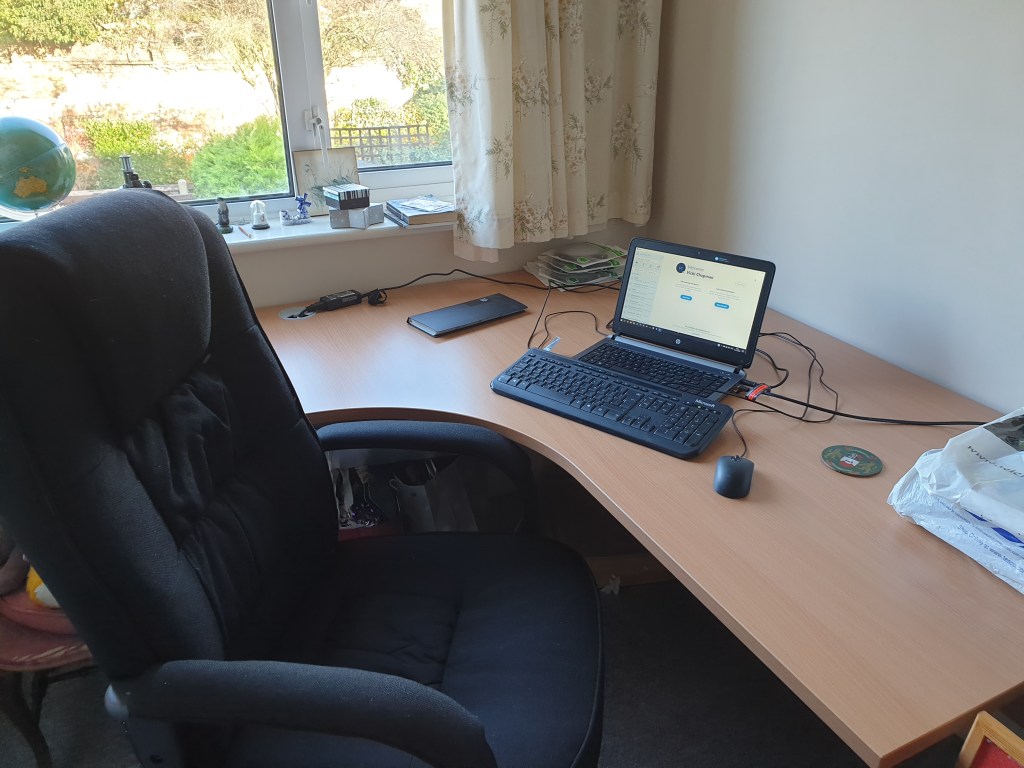
We finally agreed that I should have my own desk space so purchased desk and chair, and set about tidying up the junk.
This weekend has seen a couple of trips to the tip and a lot of sorting of boxes and files, but finally created enough space to get the desk installed. I now have my own workspace and comfy chair. I’m actually quite looking forward to doing some work from here.
I also get the window seat, so can watch the birds come and go and gaze out of the window. I mean, concentrate really hard.
One of the things I dread when I go back to work after some annual leave is the size of the email in box. I refuse to log in when I’m on leave or my day off. If I’m not at work, I’m not at work.
To some in managerial positions that might seem like sacrilege. Surely if you’re a manager you should be available all the time. Well, no. I’m available the hours to which I am contracted to and for what you pay me, and if the work you are asking me to do falls outside of that, then we need to have a serious conversation.
I have done my fair share of ridiculous hours, weekends, nights, earlies etc. Been on call, been on conference meetings, and been in for meetings on my day off and all sorts. The trouble is, the more you do it, the more it becomes expected, and the more you get in the habit of doing it, and don’t switch off.
I do make some concessions. If a meeting absolutely has to take place on my day off and its imperative that I’m there, I will of course support it if I can. But I ensure I get that time back.
I have so much else going on in life outside of work too that I can’t afford to do it. My brain would explode.
There should be nothing that either can’t be dealt with by someone else, or that can’t wait until I get back.
My role as a manager and leader is to equip my staff to be self sufficient and confident to deal with most eventualities, and I should not be a bottleneck in the way.
So, 305 emails in the inbox after 1 week off. A chunk of those are routine and can be dispatched fairly promptly. That took me down to 206 by lunchtime. Then there’s the ones that I do need to read but don’t necessarily have to do anything with or about. Then there’s the ones that do require input.
By the end of the first day back I’ve got them down to a manageable 31. And don’t forget, more were coming in throughout the day too.
Another day tomorrow and another new bunch of emails to wade through.
We’re having a tidy up of the study to make room for a second office desk and chair.
Over the years what was step daughter #1’s bedroom became the spare room and eventually we moved the computer out of our bedroom and into this room, therefore redesignating it as the study. However, it also became the junk room.
Over years and years, more and more stuff has been pushed in there as either being “useful one day” or “file it later”. To the point where we can’t actually get anywhere near the other end of the room, and now have no idea whats there. To be honest, a bit embarrassing.
With lockdown #2 now underway and the potential for things to change for me at work, it might be possible, or desirable, for me to work from home from time to time. It would also be more beneficial as I do more #bellringing stuff. C is on the computer quite a lot doing whatever it is he does, so if I had a desk and set up too, I could get on with things. I know that I could sit on the sofa with my laptop but that’s not conducive to a nine and a half hour working day. I need a proper chair and desk.
So, desk and chair have been ordered, although the desired chair was out of stock, so was the second preference, so ended up with third choice, which of course was more expensive, but they’re giving it to us at the same price as the first choice, for the inconvenience.
Had a phone call at 07:30 (!) Thursday morning saying that desk will arrive tomorrow. Eek, better start making room for it then.
Why does tidying up always create more mess? C is making a start as the first hurdles are his. Most of my stuff is at the back of the room, so he’s got to make some headway before I can do much. This is going to take some time. He seems to be checking everything and reading things, and deciding that “that would be useful to hang on to” despite the fact that’s its clearly not been used in many, many years.
There are now bin bags, recycling bags and piles of other stuff accumulating in the lounge, ready for the next phase. This is going to take a while.
Yesterday I had a number of virtual meetings both at work and for #bellringing in the evening. This has consisted of using various different video conferencing platforms.
At work we use Starleaf which enables meetings and video conferencing, screen sharing and so on. You have to send your attendees a link with a meeting ID and password and you can dial in on a phone instead.
We have a fortnightly Skype meeting with family members and our daughter. You need a log in for that and connect with other users first.
We use Zoom for #bellringing meetings and to support RingingRoom sessions. Similar to Starleaf with the ability to run polls and breakout rooms as well. I have acpaid Zoom account which often means I’m the one setting the meeting up. Again you can send attendees a link to access the meeting or dial in.
Tuesday evening I was on a meeting with the Communications & Marketing workgroup and we used MS Teams for the first time. It seems to have similar functions to Zoom and Starleaf although it did take a bit of getting into. It wasn’t particularly intuitive at first. Once you get into it it made a bit more sense but I haven’t figured out how to add files or calendar dates yet but probably need to spend a bit more time rummaging around it to get myself acquainted with it. We’re supposed to be getting this rolled out at work eventually.
There are so many different platforms being used for various things sometimes it’s a wonder that it all works. So many log in IDs and passwords to remember.






 Bells, Bakes & Bettering Myself