Can’t be in 2 places at once

Last night had a clash of #bellringing diaries. I should have been at an advanced district practice but also needed to be at a Central Council exec meeting.

This clash now happens very month. Last year it wasn’t a problem because we weren’t running the advanced practices. However we decided to put them back on the virtual agenda this year and try them out. Last month was the first one and as I set up the Zoom I kinda needed to be there so sent my apologies to the CC meeting.

This month though I needed to be at the CC meeting as I was on the Agenda. I did set up the advanced practice zoom session but needed to hand it over to someone else to run.

It was an interesting experiment. C attended the advanced practice on the PC next to me on my laptop attending the CC meeting. We both glanced over at the other several times and at one point were both talking to our respective meetings at the same time.

I missed out on practicing Little Bob Major and Yorkshire Surprise Major and the fact that they finished soon after 9pm. My meeting went on until 10:20pm.

Next month I’ll probably go to the advanced practice and give apologies to the CC meeting. I’ll probably end up alternating.

Staring at a screen too long

With meetings, #bellringing, family gatherings, talks, plus the usual social media, emails, work etc, I find that I’m currently spending roughly 12 hours a day staring at a screen.  Small wonder my eyes are dried out at the end of the evening.

I work a 9.5hr day Monday to Friday and most evenings am either on a Zoom meeting, or a virtual #bellringing session.  On my non-working day I have, one, sometimes two virtual #bellringing sessions and more often than not a meeting in the afternoon on Zoom as well.  Then every other Sunday there’s the family Skype gathering.

Apparently, there’s a name for it now ‘digital eye strain’ or ‘computer vision syndrome’.  However, help it at hand with some top tips on how to reduce eye strain from All About Vision:

  1. Get an eye test and tell the optician how much time you spend on the computer or devices.
  2. Reduce excessive bright light.  Close blinds or curtains, use lower intensity light bulbs, and position the computer so that windows are at the side, not in front or behind.
  3. Consider an anti-glare screen for your monitor and have a more muted coloured wall to reduce glare from reflective surfaces.
  4. Upgrade your monitor with a flat-panel LED screen in anti-reflective surface.
  5. Adjust the brightness, text size and contrast, colour temperature or your screen.
  6. Blink.  When staring at a screen, people blink less frequently — only about one-third as often as they normally do. Blinking moistens your eyes to prevent dryness and irritation.
  7. Exercise your eyes by frequently looking away from the screen at a distant object and focus on it for at least 20 seconds.
  8. Take frequent breaks to help reduce neck, shoulder and back pain.  Get up and move around for 10 minutes every hour.
  9. Modify your workstation.  Check your posture and ensure that your chair is the right height with your feet comfortably on the floor.  Make sure that your screen is 20-24 inches away from your eyes with the centre of the screen 10-15 degrees below your eye level.
  10. Consider computer glasses.  Customised glasses which photochromic lenses.

I am conscious that my eyes are tired at the end of the day, and that I do probably need to get up and move about a bit more.

Maybe I will also try a digital detox day as well.  A day without any screen time at all.  Hmmmm!

Succumbing to the inevitable

C used to ring handbells fairly regularly and notched up several quarter peals in years gone by. When his mum died he spent some of the inheritance on a set of 12 handbells. Sadly, those handbells haven’t seen much light. We did have a couple of goes once but I was totally rubbish and couldn’t get my head around it.

I always admire the fact that he could pick up pair of handbells and without too much trouble join in something.

A couple of years ago I was a student on a handbell training course and with proper instruction, helpful advice and lots of patience I did manage to get through Plain Bob Minor on all pairs. It completely did my brain in but I was pleased to have done it. It always seemed like one of those things I should have a proper go at. I’ve not rung handbells since then.

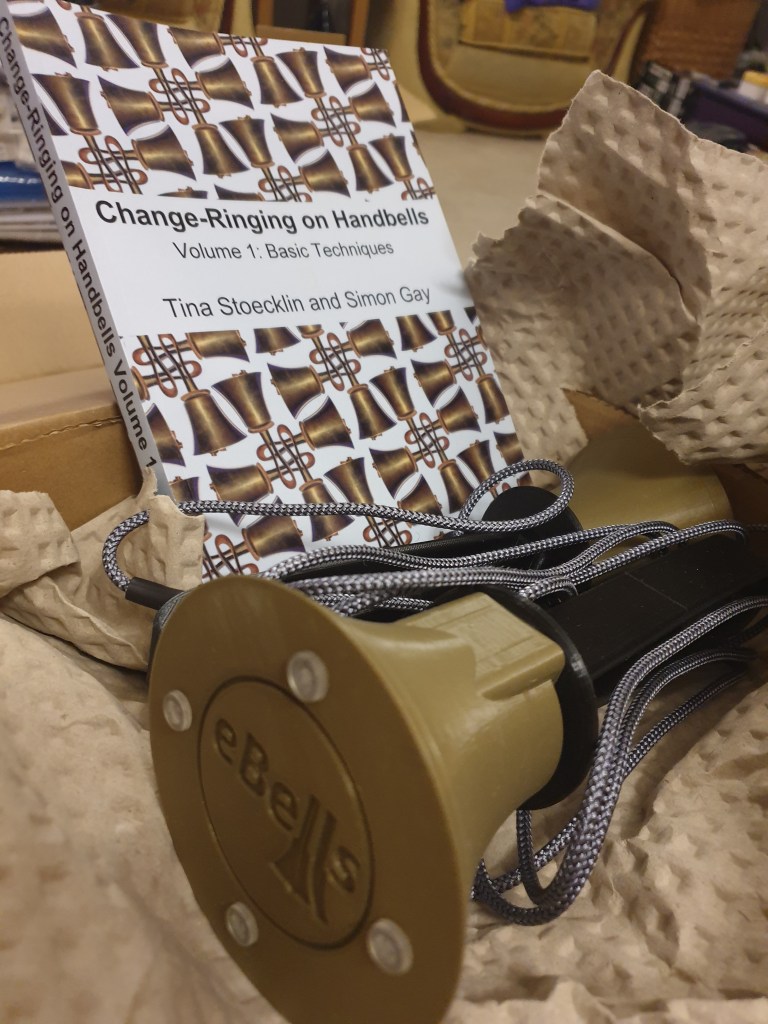
Since lockdown handbell ringing has really enjoyed a resurgence. Its the one thing that people could meet in small groups outside, when that was allowed. Then came along the creation of Handbell Stadium the virtual version of handbell ringing with Men in Black avatars. The next upgrade came with the creation of e-bells. Realistic looking, feeling and weighted handbells that plug into your computer that you synchronise with Handbell Stadium for a more realistic experience, rather than pushing keys.

So, eventually C decided that he’d like a pair of e-bells for his birthday. I ordered two sets and the companion book Change Ringing on Handbells by Tina Stoeklin and Phil Gay. They arrived today, excellent service given he left it late to tell me that’s what he wanted. I’ll leave him to do the technical set up and I’ll have a few goes on my own with my two new avatar friends before I join in with anyone else.

Don’t think you’ll be seeing me featured on Bellboard any time soon though.